
















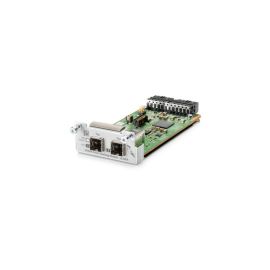
Dell Y9C52 Force10 S60 2P 12GbE Stacking Module


-
$35.20 In Stock - Ships Worldwide Order by 2:00 PM ET for Overnight ShippingWas: $40.00You Save: $4.80 12% OFF
-
Warranty: 90-day return/replacement
Click here to read our Return Policy for returns/replacements.
Y9C52
Free ground shipping within the
United States

Government, Federal & Education Procurement
We support quotes, POs, stock docs, and compliance invoicing.
Email: support@buyrouterswitch.com SAM.gov Registered Vendor CAGE Code : 23P86
overview
faqs
reviews
Y9C52 Overview
DELL - Force 10 S Series S60 2 Port 12 Gigabit Stacking MODULE(Y9C52).
Need help with Y9C52?
Get pricing, availability, lead time, and compatible options from our team. Chat with us live or email support@buyrouterswitch.com
Frequently Asked Questions
What is the primary function of the Dell Y9C52 stacking module? +
The Dell Y9C52 is a dedicated stacking module designed to enable high-speed backplane connectivity between compatible Dell networking switches. By installing this module, you create a unified logical switch, allowing for simplified management, increased port density, and enhanced redundancy across your stack, ensuring that your network infrastructure scales efficiently while maintaining high availability for mission-critical applications.
Which Dell switch series is compatible with the Y9C52 module? +
The Y9C52 module is engineered for specific Dell networking switch architectures. It is essential to verify your existing switch chassis model numbers against the official compatibility matrix before installation. Utilizing this module within the supported hardware ecosystem ensures seamless integration, stable stacking performance, and full feature functionality as defined by Dell's proprietary stacking protocols for your specific switch series.
How does the Y9C52 improve overall network performance? +
By providing a high-bandwidth stacking interface, the Y9C52 allows multiple switches to operate as a single entity with a shared control plane. This reduces latency between member switches and optimizes packet forwarding across the stack. It essentially eliminates bottlenecks that occur in standard uplink configurations, allowing your network to handle increased traffic loads and intensive data processing tasks with greater reliability and speed.
Does installing the Y9C52 module require a system reboot? +
Typically, the installation and initial recognition of a stacking module require a scheduled maintenance window. While some switch models support hot-swapping under specific conditions, best practices dictate that you power down the target switch or the entire stack to ensure the module is securely seated and properly initialized during the boot sequence, minimizing the risk of physical interface errors or configuration mismatches.
What is the recommended method for cabling switches using the Y9C52? +
For optimal performance and redundancy, we recommend a ring topology when connecting your switches with the Y9C52 modules. This ensures that if a single cable or module fails, the remaining stack members maintain connectivity through the alternative path. Always use high-quality, manufacturer-certified stacking cables to ensure the physical layer integrity remains robust and signal degradation is kept to an absolute minimum.
Can I mix different switch models within a stack using the Y9C52? +
Stacking compatibility depends strictly on the firmware version and hardware architecture supported by your specific Dell switch series. While the Y9C52 facilitates the physical connection, the logical stack must consist of models that share the same stacking protocol. We strongly advise checking your current firmware release notes to ensure all units in the stack are running compatible software versions to prevent synchronization issues.
How do I monitor the status of the Y9C52 after deployment? +
Once the module is deployed, you can monitor its health and status through the switch’s command-line interface or web-based management console. Look for stacking status commands that report on link state, module presence, and backplane bandwidth utilization. Real-time alerts can also be configured via SNMP or Syslog to notify your network administrators of any physical link changes or potential hardware errors within the stacking cluster.
Is any specific configuration required after physically installing the Y9C52? +
After the physical installation, you must configure the stacking priority and stack member IDs through the switch console. This ensures that the stack elects a primary unit correctly and maintains consistent configuration across all members. Failure to assign unique IDs or set the appropriate priority can lead to unexpected election processes and potential network downtime during the startup phase.
How can I obtain a bulk quote for multiple Y9C52 modules? +
If you are planning an enterprise-wide infrastructure upgrade and require multiple Y9C52 modules, BuyRouterSwitch.com makes the procurement process efficient. Simply contact our dedicated sales team through our website to request a bulk quote. We specialize in providing competitive volume pricing for network hardware, ensuring your project remains within budget while maintaining access to high-quality, authentic networking components for your data center.
Why should I choose BuyRouterSwitch.com for my Dell networking hardware? +
BuyRouterSwitch.com is a trusted source for professionals seeking genuine, high-performance hardware. We focus on providing a seamless ordering experience for organizations needing reliable, authentic networking gear. By choosing us for your Y9C52 modules, you gain access to a streamlined procurement process, expert-verified inventory, and a partner dedicated to supporting your large-scale network deployments with the exact equipment required for your specific enterprise environment.


Related Products

Special Price
$281.06
was
$299.00
Special Price
$64.50
was
$75.00

Special Price
$41.40
was
$45.00

Special Price
$319.60
was
$340.00

Special Price
$425.60
was
$489.44

Special Price
$40.95
was
$45.00
Need Help Choosing the Right Part? Talk to an Expert
-
+1 (800) 870-9487Mon-Fri 8am-5pm EST
-
support@buyrouterswitch.comTechnical support
