
































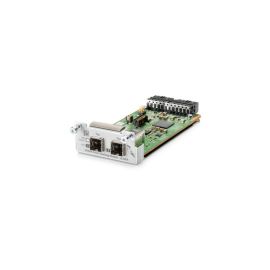
HPE JL325-61001 Aruba 2930 2-Port Stacking Module


-
$388.50 In Stock - Ships Worldwide Order by 2:00 PM ET for Overnight ShippingWas: $446.78You Save: $58.28 13% OFF
-
Warranty: 90-day return/replacement
Click here to read our Return Policy for returns/replacements.
- Authenticity: Original Genuine OEM
JL325-61001
Free ground shipping within the
United States

Government, Federal & Education Procurement
We support quotes, POs, stock docs, and compliance invoicing.
Email: support@buyrouterswitch.com SAM.gov Registered Vendor CAGE Code : 23P86
overview
specifications
faqs
reviews
JL325-61001 Overview
HPE JL325-61001 Aruba 2930 2-port Stacking Module :
Need help with JL325-61001?
Get pricing, availability, lead time, and compatible options from our team. Chat with us live or email support@buyrouterswitch.com
Specifications
Overview
| Condition | New |
|---|---|
| Brand | HPE |
| Stock | In Stock |
Key Features
| Device Type | Network Stacking Module |
|---|---|
| Form Factor | Plug-in Module |
Networking
| Ports | 2 |
|---|---|
| Connectivity Technology | Wired |
Expansion / Connectivity
| Interfaces | 2 X Stack Port |
|---|
Frequently Asked Questions
What is the primary function of the HPE JL325-61001 stacking module? +
The HPE JL325-61001 serves as a dedicated stacking module designed to expand the capacity and management capabilities of your HPE switch infrastructure. By installing this module, you enable high-speed backplane connectivity between multiple switches, allowing them to operate as a single logical entity to streamline network administration and improve overall system resilience.
Which HPE switch series are compatible with the JL325-61001 module? +
This module is engineered for specific HPE Aruba switch series that require additional stacking hardware for physical backplane connectivity. It is critical to verify your existing switch model's documentation to ensure it natively supports this specific hardware module, as compatibility is strictly limited to the switch architectures designed to house this physical interface.
Does installing the JL325-61001 improve network performance in a stack? +
Yes, by utilizing the JL325-61001 for stacking, you create a high-bandwidth, low-latency communication path between member switches. This design offloads traffic from standard uplink ports and keeps inter-switch data within the stack, significantly improving throughput efficiency and reducing bottleneck risks during high-traffic intervals across your enterprise network environment.
Is any additional software licensing required after installing the JL325-61001? +
Generally, the JL325-61001 functions as a hardware-level component, and its primary operations do not necessitate supplemental feature licenses beyond what your current switch operating system requires. However, you should review your switch's firmware version to ensure it has the latest updates to recognize and optimize the stacking module hardware once it is securely seated.
How does the JL325-61001 module enhance network reliability? +
This module facilitates redundant stack topology configurations, allowing for sub-second failover if a master unit or connection cable fails. By grouping switches, you ensure that network services remain highly available, as the stack can continue to forward traffic and maintain its configuration even during hardware maintenance or unexpected outages of individual stack members.
Can I use the JL325-61001 for long-distance switch interconnections? +
The JL325-61001 is designed specifically for short-reach, high-speed physical stacking within a single equipment rack or cabinet. It is not intended for long-distance connectivity; for linking switches across different locations or distant server rooms, standard fiber optic uplinks using appropriate SFP+ or QSFP+ transceivers remain the recommended industry practice.
What is the recommended procedure for deploying the JL325-61001? +
Deployment should be performed while the switch is powered off to ensure safety. Slide the module into the designated slot until it clicks, then secure it with the integrated thumbscrews. Once the hardware is installed, connect your stacking cables between units, verify the physical connection status on the front panel LEDs, and proceed with the logical stack configuration via the CLI.
What should I look for to confirm the JL325-61001 is active after installation? +
Once the module is installed and the switches are powered on, you can verify the status through the switch CLI using standard stacking commands to check for member detection. Additionally, monitor the physical status LEDs located on the face of the module, which provide immediate visual confirmation of link activity and stack membership status.
How can I request a bulk quote for multiple JL325-61001 units? +
If you are planning an enterprise-scale refresh and require a significant quantity of JL325-61001 modules, please contact the BuyRouterSwitch.com sales team directly. We are experienced in handling large-volume requests and can provide customized pricing structures to better accommodate your project’s budget requirements while ensuring you get the specific hardware needed for your rollout.
Why should I choose BuyRouterSwitch.com for my HPE hardware procurement? +
BuyRouterSwitch.com specializes in providing authentic enterprise networking equipment to IT professionals globally. We prioritize inventory accuracy and streamlined procurement processes, ensuring that your critical hardware, such as the JL325-61001, is sourced reliably. Our focus is on providing a seamless purchasing experience that keeps your infrastructure projects moving forward on schedule.


Related Products

Special Price
$45.20
was
$51.98
Special Price
$90.85
was
$104.48

Special Price
$51.06
was
$58.72

Special Price
$408.48
was
$469.75

Special Price
$425.60
was
$489.44

Special Price
$51.52
was
$59.25
Need Help Choosing the Right Part? Talk to an Expert
-
+1 (800) 870-9487Mon-Fri 8am-5pm EST
-
support@buyrouterswitch.comTechnical support
