
































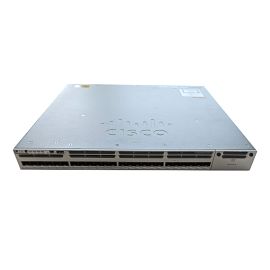
Dell WT35C Networking Z9100-ON 32 X 100GbE + 2X SFP+ Switch


-
$627.00 In Stock - Ships Worldwide Order by 2:00 PM ET for Overnight ShippingWas: $721.05You Save: $94.05 13% OFF
-
Warranty: 90-day return/replacement
Click here to read our Return Policy for returns/replacements.
WT35C
Free ground shipping within the
United States

Government, Federal & Education Procurement
We support quotes, POs, stock docs, and compliance invoicing.
Email: support@buyrouterswitch.com SAM.gov Registered Vendor CAGE Code : 23P86
overview
specifications
faqs
reviews
WT35C Overview
DELL WT35C Networking Z9100-on 32 X 100gbe + 2 X Sfp+ Switch With 2x Psu, Os9 And Standard Airflow
Need help with WT35C?
Get pricing, availability, lead time, and compatible options from our team. Chat with us live or email support@buyrouterswitch.com
Specifications
Overview
| Condition | Refurbished |
|---|---|
| Brand | Dell |
| Stock | In Stock |
Key Features
| Manufacturer | DELL Technologies |
|---|---|
| Manufacturer Part Number | WT35C |
| Product Line | Powerswitch |
| Product Model | Z9100-on |
| Product Name | Powerswitch Z9100-on Ethernet Switch |
| Product Type | Ethernet Switch |
Networking
| Ports | 32 X Fixed 100gbe Qsfp28 Ports |
|---|---|
| Uplink Ports | 2 X Fixed 1/10gbe Sfp+ Ports |
| Power Supply | 2 X Redundant, Hot-swappable 750w Ac Psus |
| Poe | N/a |
| Transceivers | Not Included |
| Airflow | Standard (i/o To Psu) |
| Default Operating System | DELL Os9 Enterprise |
Frequently Asked Questions
What is the primary role of the Dell WT35C in an enterprise network environment? +
The Dell WT35C is a high-performance managed rackmount switch engineered to provide reliable Layer 2 and Layer 3 switching capabilities. It is designed for enterprise environments that require robust traffic management, secure network segmentation, and consistent throughput for bandwidth-intensive applications within data centers or wiring closets.
Does the WT35C support advanced management features for remote configuration? +
Yes, this managed switch supports a comprehensive suite of management tools, including industry-standard CLI, SNMP, and web-based graphical interfaces. These features allow network administrators to efficiently monitor traffic, configure VLANs, and perform remote troubleshooting, ensuring maximum network uptime and simplified operational control across the entire infrastructure.
How does the WT35C handle network traffic for latency-sensitive applications? +
The WT35C is equipped with sophisticated Quality of Service (QoS) features that prioritize critical data traffic. By implementing traffic shaping and strict priority queuing, the switch minimizes jitter and latency, ensuring that voice, video, and real-time data packets are processed with the necessary performance levels required for smooth enterprise operations.
Is the WT35C suitable for rackmount deployment in standard data centers? +
Absolutely. The WT35C is built with a standard rack-mountable chassis designed for integration into industry-standard 19-inch server racks. Its physical dimensions and airflow design ensure that it fits seamlessly into high-density deployments, allowing for organized cable management and efficient thermal regulation within the rack space.
What kind of security protocols can I implement on the WT35C? +
This switch supports a robust range of security features to protect your network perimeter. Administrators can leverage Access Control Lists (ACLs), port security, and 802.1X authentication to regulate access to the network. These protocols help mitigate unauthorized entry and protect sensitive organizational data from internal and external threats.
Does the WT35C support VLAN tagging for network segmentation? +
Yes, the WT35C offers full support for IEEE 802.1Q VLAN tagging. This allows you to logically segment your network into multiple virtual subnets, which is essential for improving performance, reducing broadcast traffic, and enhancing security by isolating sensitive departments or specific device types from the main network traffic.
What is the typical power consumption and cooling requirement for the WT35C? +
The WT35C is designed for power-efficient operation, though actual power draw depends on the specific port utilization and traffic load. It utilizes active cooling mechanisms to maintain optimal operating temperatures. We recommend ensuring your rack environment provides adequate ventilation to support the internal fans and prevent heat accumulation during peak traffic hours.
How do I upgrade the firmware on the Dell WT35C switch? +
Firmware updates for the WT35C are performed through the administrative interface, typically via the CLI or web-based management portal. It is recommended to download the latest authorized firmware packages from the official Dell support site and follow the documented update procedures to maintain optimal security patches and feature performance.
Can BuyRouterSwitch.com provide a bulk quote for multiple WT35C units? +
Certainly. BuyRouterSwitch.com specializes in providing competitive bulk quotes for large-scale enterprise rollouts. If you are planning a significant network upgrade or require a high volume of WT35C switches, contact our sales department directly. We provide tailored pricing structures that help organizations manage procurement costs effectively while securing the hardware needed for their projects.
Why should I source my Dell WT35C units through BuyRouterSwitch.com? +
Choosing BuyRouterSwitch.com ensures that you receive authentic enterprise hardware sourced through reliable supply chains. Our team is dedicated to providing a seamless procurement experience for IT professionals, focusing on accurate order fulfillment, professional assistance for complex hardware requirements, and a streamlined purchasing process that keeps your infrastructure projects moving forward on schedule.


Related Products

Special Price
$212.44
was
$244.31

Special Price
$638.40
was
$734.16

Special Price
$2,993.90
was
$3,290.00

Special Price
$99.90
was
$114.89

Special Price
$638.40
was
$734.16

Special Price
$1,166.00
was
$1,340.90
Special Price
$1,165.50
was
$1,340.33

$425.60

Special Price
$695.40
was
$799.71

Special Price
$7,302.50
was
$8,397.88
Need Help Choosing the Right Part? Talk to an Expert
-
+1 (800) 870-9487Mon-Fri 8am-5pm EST
-
support@buyrouterswitch.comTechnical support
