







Name:

WS-X45-SUP7-E Catalyst 4500 E-Series Supervisor Engine

Mfr. Part #: WS-X45-SUP7-E
Condition: Refurbished
Availability: In Stock
Brand: Cisco
Price: $180.34

WS-X45-SUP7-E

Catalyst 4500 E-Series Supervisor Engine 7-E, 848Gbps WS-X45-SUP7-E
Shipping:
Free ground shipping within United States up to 10LBS
Accepting POs:
We accept Purchase Orders from Government Agencies, Defense, Hospitals, Universities, Schools and Businesses.
  • Genuine Guarantee
  • Price Protection
  • Bulk Order Rebate
  • 30 Day Return Policy
overview
specifications
reviews

WS-X45-SUP7-E Overview

Catalyst 4500 E-Series Supervisor Engine 7-E, 848Gbps WS-X45-SUP7-E

Overview

Cisco WS-X45-SUP7-E=, 10,100,1000,10000 Mbit/s, IEEE 802.1Q, IEEE 802.1p, IEEE 802.1s, IEEE 802.1w, IEEE 802.1x, IEEE 802.3, IEEE 802.3az, 55000 entries, 848 Gbit/s, 250 Mpps, 48 Gbit/s

WS-X45-SUP7-E, the Cisco Catalyst 4500E supervisor engine 7-E, is the leading borderless networks access and aggregation supervisor engine for the Cisco Catalyst 4500E series. Supervisor Engine7-E delivers high-performance aggregation deployments with increasing Gigabit Ethernet and 10G Ethernet fiber density along with hardware capabilities to support enterprise-level aggregation functions.

Notice that WS-X45-SUP7-E= is similar with WS-X45-SUP7-E, except that WS-X45-SUP7-E= is a spare one. 

Quick Spec

Figure 1. WS-X45-SUP7-E Appearance.
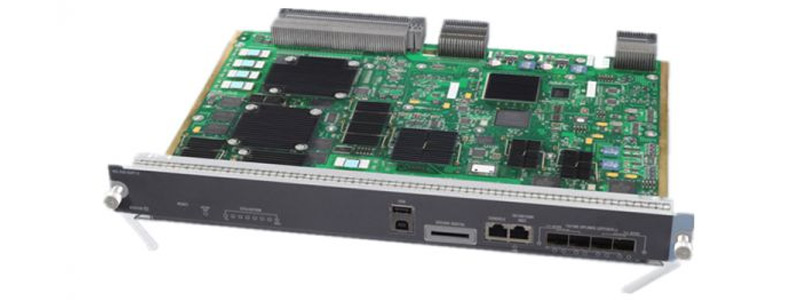
WS-X45-SUP7-E Appearance

Product Code

WS-X45-SUP7-E

Centralized switching capacity

848 Gbps

Per-slot switching capacity

48 Gbps

Throughput

250 Mpps for IPv4

125 Mpps for IPv6

250 Mpps for L2 Bridging

IPv4 routing entries

256,000

IPv6 routing entries

128,000

Multicast routes

16,000 (available with Cisco IOS XE 3.1.0 SG)

32,000 (Available with Cisco IOS XE 3.2.0 SG or later)

CPU

Dual core; 1.5 GHz

CPU queues

64

Synchronous dynamic RAM (SDRAM)

2 GB upgradable to 4 GB

Nonvolatile RAM (NVRAM)

1 GB

Security and QoS hardware entries

128,000

Cisco Network Admission Control (NAC) andDynamic

Host Configuration Protocol (DHCP) snooping entries

12,000

MAC addresses

55,000

Active VLANs

4,094

Address Resolution Protocol (ARP) entries

47,000

Spanning Tree Protocol instances

10,000

Switched virtual interfaces (SVIs)

4,094

Switched Port Analyzer (SPAN)

Maximum of 8 sessions: ingress or egress

Product Details

Figure 2. WS-X45-SUP7-E can be installed in the Catalyst 4500 switch Chassis.

WS-X45-SUP7-E installed in the switch

Figure 3. WS-X45-SUP7-E Front Panel.

WS-X45-SUP7-E front panel

Note:

① STATUS LED   ② Reset Button   ③ ACTIVE SUP LED   ④ UTILIZATION LED   ⑤ USB Ports   ⑥ Secure Digital Port   ⑦ Console Port

⑧ 10/100/1000 MGT Port   ⑨ 4 × 1G/10G Uplinks SFP/SFP+

Supported Line Cards and Modules

Model

Description

WS-X4748-UPOE+E

Cisco Catalyst 4500E Series, 48-port 802.3af PoE, 802.3at PoEP, and UPoE 10/100/1000

WS-X4748-RJ45V+E

Cisco Catalyst 4500E Series, 48-port PoE 802.3at 10/100/1000 (RJ-45)

WS-X4712-SFP+E

Cisco Catalyst 4500E Series, 12-port 10 Gigabit Ethernet (SFP+)

WS-X4748-SFP-E

Cisco Catalyst 4500E Series 48-port Gigabit Ethernet (SFP)

WS-X4724-SFP-E

Cisco Catalyst 4500E Series 24-port Gigabit Ethernet (SFP)

WS-X4712-SFP-E

Cisco Catalyst 4500E Series 12-port Gigabit Ethernet (SFP)

WS-X4648-RJ45V-E

Cisco Catalyst 4500E Series, 48-port 802.3af PoE 10/100/1000 (RJ-45)

WS-X4648-RJ45V+E

Cisco Catalyst 4500E Series, 48-port Premium PoE 10/100/1000 (RJ-45)

WS-X4648-RJ45-E

Cisco Catalyst 4500E Series, 48-port 10/100/1000 (RJ-45)

WS-X4606-X2-E

Cisco Catalyst 4500E Series, 6-port 10 Gigabit Ethernet (X2)

WS-X4624-SFP-E

Cisco Catalyst 4500E Series, 24-port Gigabit Ethernet (SFP)

WS-X4612-SFP-E

Cisco Catalyst 4500E Series 12-port Gigabit Ethernet (SFP)

Catalyst 4500E Series Supervisor, 848 Gbps

  • 10,100,1000,10000 Mbit/s
  • Access Control List (ACL)
  • Quality of Service (QoS) support
  • 280 W

Summary Description

Cisco WS-X45-SUP7-E, 10,100,1000,10000 Mbit/s, IEEE 802.1Q, IEEE 802.1p, IEEE 802.1s, IEEE 802.1w, IEEE 802.1x, IEEE 802.3, IEEE 802.3az, 55000 entries, 848 Gbit/s, 250 Mpps, 48 Gbit/s

Need help with WS-X45-SUP7-E?

Get pricing, availability, lead time, and compatible options from our team. Chat with us live or email support@buyrouterswitch.com

Specification

WS-X45-SUP7-E Specification

WS-X45-SUP7-E Specification

Chassis compatibility

All Catalyst 4500 E-series switches

Software requirements (minimum)

Refer to your software release notes for the latest software release requirements

Chassis slot restrictions

Catalyst 4503-E: Slot 1 only

Catalyst 4506-E: Slot 1 only

Catalyst 4507R-E and Catalyst 4507R+E: Slot 3 and slot 4

Catalyst 4510R-E and Catalyst 4510R+E: Slot 5 and slot 6

Bandwidth per slot

48-Gbps

Memory

2-GB (upgrade to 4-GB)

STATUS LED

The status LED indicates the current health of the supervisor engine and the current software state.

RESET switch

The RESET switch is used to reset and restart the switch.

Note Use a paper clip or other small, pointed object to press the RESET switch.

ACTIVE SUP LED

The active supervisor engine LED indicates whether the supervisor engine is active or in standby mode in redundant supervisor engine configurations.

UTILIZATION LEDs

Eight LEDs indicate (as an approximate percentage) the current traffic load over the backplane.

USB connectors

Two USB 2.0 ports are provided. Port 1 operates in device mode (upstream) and port 2 in host mode (downstream). Port 1 has a standard Type B USB connector and can be used as a USB console.Port 2 has a USB type A connector and a standard USB 2.0 device like a flash memory device can plug into this connector.

SECURE DIGITAL slot

A standard Secure Data (SD) memory card interface is provided on the front panel

CONSOLE port

This is a 10/100/1000 port that uses an RJ-45 connector. The console port allows you th access the switch either locally (with a console terminal) has an RJ-45 connector. The console port allows you to perform the following functions:

Configure the switch from the CLI

Monitor network statistics and errors

Configure SNMP agent parameters

10/100/1000 MGT port

The Ethernet management port is a Layer 3 host port to which you can connect a PC. You can use the Ethernet management port instead of the switch console port for network management. When managing a switch, connect the PC to the Ethernet management port on a Catalyst 4500 E-series switch.

Note When connecting a PC to the Ethernet management port, you must assign an IP address.

LINK LED

The 10/100/1000 MGT port has a link LED associated with it.

1G/10G UPLINKS (SFP/SFP+) ports

The Supervisor Engine 7-E has four 1-G or 10-G ports that use either SFP transceivers or SFP+ transceivers.

Uplink port LEDs

Each of the four uplink ports has two LEDs associated with it. One LED displays port status when a 1-GB SFP transceiver is installed in the port socket. The second LED displays uplink port status when a 10-GB SFP+ transceiver is installed in the port socket.

Power requirement

302 W

Operating temperature

Certified for operation: 32° to 104°F (0° to 40°C)

Designed and tested for operation: 32° to 130°F (0° to 55°C)

Humidity (RH) ambient (noncondensing)

10 to 90%

Operating altitude

Certified for operation: 0 to 6500 ft (0 to 2000 m)

Designed and tested for operation: -200 to 10,000 ft (-60 to 3000 m)

Operating temperature

Certified for operation: 32° to 104°F (0° to 40°C)

Designed and tested for operation: 32° to 130°F (0° to 55°C)

Supervisor Engine 7-E Front Panel LEDs

STATUS

The STATUS LED indicates the status of he supervisor engine.

Green—All diagniostic tests have passed

Orange—System boot or a diagnostic test is in progress.

Red—A diagnostic test failed.

Off—The supervisor engine is disabled or is not powered up.

ACTIVE SUP

Indicates whether the supervisor engine is active or standby.

Green—Supervisor engine is active (in redundant supervisor engine configurations)

Off—Supervisor engine is in standby mode (in redundant supervisor engine configurations)

UTILIZATION

When the switch is operational, the eight utilization LEDs indicate the current traffic load over the backplane as an approximate percentage value. Each LED lit green indicates approximately 12.5 percent of load.

MGT port

Indicates the status of the 10/100/1000BASE-T Ethernet management port

Green—The link is operational.

Orange—The link is disabled by user.

Flashing orange—The power-on self-test indicates a faulty port.

Off—No signal is detected or there is a link configuration failure.

Uplink link

Indicates the status of the uplink port

Green—The link is operational.

Orange—The link is disabled by user.

Flashing orange—The power-on self-test indicates a faulty port.

Off—No signal is detected or there is a link configuration failure.

Need Help Choosing the Right Part? Talk to an Expert

  • +1 (800) 870-9487
    Mon-Fri 8am-5pm EST
  • support@buyrouterswitch.com
    Technical support
People