
















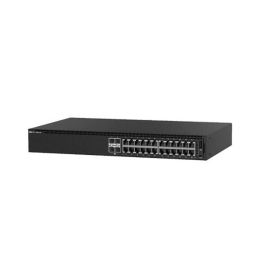
Dell PK7K0 EMC Networking N1124T-ON 24 ports Managed Switch


-
$449.55 In Stock - Ships Worldwide Order by 2:00 PM ET for Overnight ShippingWas: $516.98You Save: $67.43 13% OFF
-
Warranty: 90-day return/replacement
Click here to read our Return Policy for returns/replacements.
PK7K0
Free ground shipping within the
United States

Government, Federal & Education Procurement
We support quotes, POs, stock docs, and compliance invoicing.
Email: support@buyrouterswitch.com SAM.gov Registered Vendor CAGE Code : 23P86
overview
specifications
faqs
reviews
PK7K0 Overview
DELL PK7K0 Emc Networking N1124t-on 24 Ports Switch With Internal Power Supply, Os6 And Standard Airflow
Need help with PK7K0?
Get pricing, availability, lead time, and compatible options from our team. Chat with us live or email support@buyrouterswitch.com
Specifications
Overview
| Condition | Refurbished |
|---|---|
| Brand | Dell |
| Stock | In Stock |
Key Features
| Device Type | Switch 24 Ports Managed Stackable |
|---|---|
| Enclosure Type | Rack-mountable 1u |
| Subtype | Gigabit Ethernet |
| Ports | 24 X 10/100/1000 + 4 X 10 Gigabit Sfp+ |
| Performance | Switching Fabric Bandwidth: 128 Gbps , Forwarding Performance: 96 Mpps |
| Capacity | Mac Addresses: 16000 , Aggregated Links (dynamic): 144 , Lag Groups: 64 , Queues Per Port: 8 , Vlans Supported: 512 , Arp Entries: 2048 , Ndp Entries: 400 , Max Acl Rules System-wide: 4000 , Acl: 100 , Maximum Acl Rules Per Interface (ipv4) Ingress Rules: 1023 , Maximum Acl Rules Per Interface (ipv4) Egress Rules: 1023 , Maximum Acl Rules Per Interface (ipv4) Ingress Rules: 1021 , Maximum Acl Rules Per Interface (ipv4) Egress Rules: 253 |
| Mac Address Table Size | 16000 Entries |
| Routing Protocol | Igmpv2, Igmp, Igmpv3 |
| Remote Management Protocol | Snmp 2, Snmp, Rmon, Telnet, Http, Tftp, Ssh-2 |
| Encryption Algorithm | Aes, Ssl, Tls 1.0 |
| Authentication Method | Radius, Tacacs+, Ldap |
| Features | Layer 2 Switching, Mdi/mdi-x Switch, Auto-negotiation, Port Mirroring, Ip Address Filtering, Access Control List (acl) Support, Quality Of Service (qos), Front To Back Airflow, Lldp Support, Remote Switch Port Analyzer (rspan), Management Information Base (mib), Dual Firmware Images, Redundant Fans, Mac And Ip-based Acls Support, Time-controlled Acls Support |
| Compliant Standards | Ieee 802.2, Ieee 802.3, Ieee 802.3u, Ieee 802.3z, Ieee 802.1d, Ieee 802.1q, Ieee 802.3ab, Ieee 802.1p, Ieee 802.3x, Ieee 802.3ad (lacp), Ieee 802.1w, Ieee 802.1x, Ieee 802.3ae, Ieee 802.3ac, Ieee 802.1s, Ieee 802.1v, Ansi/tia-1057, Ieee 802.1ab (lldp), Ieee 802.3az, Ieee 802.3ax |
| Ram | 1 Gb |
| Flash Memory | 1 Gb |
| Default Operation System | DELL Os6 |
| Transceivers | Not Available |
Power
| Power Device | Internal Power Supply |
|---|---|
| Installed Qty | 1 |
| Power Provided | 40 Watt |
Frequently Asked Questions
What is the primary role of the Dell PK7K0 switch in a modern data center architecture? +
The Dell PK7K0 is a high-performance managed rackmount switch designed to serve as a reliable foundation for enterprise networking environments. It excels in managing data traffic across server clusters, providing robust switching capabilities that ensure low latency and high availability for mission-critical applications within your rack infrastructure.
How does the rackmount design of the PK7K0 optimize cabinet space and airflow? +
The PK7K0 features a standard rack-optimized form factor, allowing for seamless integration into existing server racks. Its internal architecture is engineered to promote efficient thermal management, ensuring that airflow remains consistent across the switch components even during high-density deployments, which helps maintain system longevity and operational stability.
Is the PK7K0 suitable for high-traffic enterprise environments requiring advanced traffic management? +
Absolutely. As a managed switch, the PK7K0 provides granular control over network traffic. It allows administrators to implement VLANs, prioritize bandwidth for critical services, and monitor performance metrics effectively. This level of manageability is essential for maintaining network integrity and optimizing throughput in enterprise settings where performance demands are constant.
How are administrative tasks handled on the Dell PK7K0? +
Management is performed through a comprehensive interface that provides visibility into the switch’s operational status. Administrators can configure security settings, manage port assignments, and update system firmware directly. This streamlined management approach reduces the complexity of maintaining large-scale network infrastructures while ensuring consistent performance across all connected ports.
Can the PK7K0 be integrated into existing multi-vendor network environments? +
The PK7K0 is designed to operate within standard networking protocols, facilitating compatibility with diverse hardware ecosystems. By adhering to industry-standard switching technologies, this Dell managed switch ensures that it can interface reliably with other network equipment, allowing for a flexible deployment strategy without vendor lock-in concerns.
What are the reliability advantages of using the Dell PK7K0 for critical infrastructure? +
Dell enterprise switches are built to sustain 24/7 operation under heavy workloads. The PK7K0 utilizes high-quality hardware components and stable firmware to minimize downtime and prevent packet loss. Its robust construction makes it a dependable choice for organizations that require constant connectivity and predictable performance for their core business operations.
What deployment scenarios are best suited for the Dell PK7K0 managed switch? +
This switch is ideal for edge connectivity, server aggregation, or top-of-rack deployments. Its managed nature makes it particularly effective in environments where network segmentation and high-speed data transfer are necessary, such as virtualization clusters or distributed office networks needing reliable link aggregation and stable port throughput.
Does the PK7K0 support the scalability needed for expanding enterprise networks? +
Yes, the PK7K0 is engineered with scalability in mind. Its managed capabilities allow for easy configuration changes as your network grows, including the addition of new devices and segments. This adaptability ensures that your initial investment continues to provide value even as your organizational data requirements evolve over time.
How can I obtain a bulk quote for multiple PK7K0 units for a large project? +
If you are planning a large-scale deployment and require multiple PK7K0 units, reach out to our dedicated sales team via the request-a-quote form on BuyRouterSwitch.com. We specialize in assisting enterprise clients with complex procurement needs and can provide competitive pricing structures tailored to your specific volume requirements.
Why should I choose BuyRouterSwitch.com for my Dell network hardware purchase? +
BuyRouterSwitch.com is a trusted source for genuine enterprise networking equipment. By purchasing through us, you gain access to our extensive inventory of authentic Dell hardware and the expertise of our sales staff. We are committed to providing a secure ordering experience and ensuring your hardware procurement process is efficient and professional from start to finish.


Related Products

JL827A HPE FlexNetwork 5140 24G PoE+ 4SFP+ EI Managed L3 Gigabit Ethernet (10/100/1000) Power over Ethernet (PoE) 1U
Part #: JL827A
HPE
Special Price
$1,638.50
was
$1,884.28

Special Price
$146.90
was
$168.94
Special Price
$587.60
was
$675.74

Special Price
$96.05
was
$110.46

Special Price
$7,475.00
was
$8,596.25

Special Price
$1,512.50
was
$1,739.38

Special Price
$410.40
was
$471.96

Cisco Catalyst 1300-24FP-4G Managed Switch, 24 Port GE, Full PoE, 4x1GE SFP, Limited Lifetime Protection (C1300-24FP-4G)
Part #: C1300-24FP-4G
Cisco
$1,808.00

Special Price
$3,277.50
was
$3,769.13

Special Price
$517.65
was
$595.00
Need Help Choosing the Right Part? Talk to an Expert
-
+1 (800) 870-9487Mon-Fri 8am-5pm EST
-
support@buyrouterswitch.comTechnical support
