
















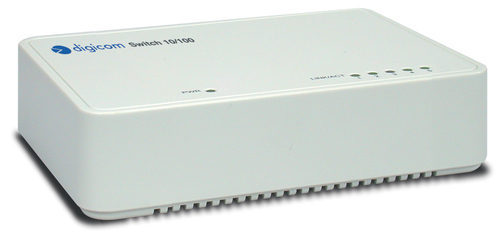
Digicom Mini Switch 5, Unmanaged, Full duplex

-
Warranty: 90-day return/replacement
Click here to read our Return Policy for returns/replacements.
Digicom Mini Switch 5 Unmanaged
Free ground shipping within the
United States

Government, Federal & Education Procurement
We support quotes, POs, stock docs, and compliance invoicing.
Email: support@buyrouterswitch.com SAM.gov Registered Vendor CAGE Code : 23P86
overview
specifications
resources
faqs
reviews
8E4128 Overview
Mini Switch 5 is a 5 ports switch 10/100 Mbit/s ideal to connect PCs and printers in your office.
The Led indicators show the speed and the status of each port. No configuration is required, the LAN structure is automatically detected.
Mini Switch 5
- Unmanaged
- Basic switching RJ-45 Ethernet ports quantity: 5
- Stackable
Summary Description
Digicom Mini Switch 5, Unmanaged, Full duplex
Need help with 8E4128?
Get pricing, availability, lead time, and compatible options from our team. Chat with us live or email support@buyrouterswitch.com
8E4128 Specifications
Overview
Manufacturer:
Digicom
Stock:
In Stock.
Stock updated on:
2024-09-03
Management features
Switch type
Unmanaged
Ports & interfaces
Basic switching RJ-45 Ethernet ports quantity
5
Power connector
DC-in jack
Network
Networking standards
IEEE 802.3
Full duplex
Yes
Auto MDI/MDI-X
Yes
Data transmission
Supported data transfer rates
10/100 Mbps
Store-and-forward
Yes
Maximum data transfer rate
0.1 Gbit/s
Design
Stackable
Yes
Power over Ethernet (PoE)
Power over Ethernet (PoE)
No
Weight & dimensions
Weight
200 g
Other features
Dimensions (WxDxH)
128 x 90 x 35 mm
Connectivity technology
Wired
Power requirements
5 Vcc
Networking features
Fast Ethernet
Connectivity LEDs
Y
Resources
Documents

Frequently Asked Questions
What are the primary use cases for the Digicom Mini Switch 5 Unmanaged? +
This compact switch is ideal for small office or home office (SOHO) environments needing to expand wired connectivity. It is perfect for connecting multiple devices like printers, desktop PCs, IP cameras, or game consoles to a single network uplink without requiring complex configurations or professional networking expertise.
Does the Digicom Mini Switch 5 support plug-and-play installation? +
Yes, this is an unmanaged switch designed for immediate deployment. It features true plug-and-play functionality, meaning you simply connect your Ethernet cables to the ports and the device automatically handles the network traffic without requiring software installation, IP address configuration, or any manual setup.
How many devices can I connect to this desktop switch? +
The Digicom Mini Switch 5 provides five independent 10/100Mbps Ethernet ports. One port is typically utilized for the incoming uplink from your modem or main router, leaving four additional ports available to connect your wired network peripherals and client devices.
Is this switch compatible with existing Gigabit Ethernet networks? +
While this switch is designed for 10/100Mbps Fast Ethernet speeds, it maintains full backward compatibility with older devices. If connected to a Gigabit network infrastructure, the switch will negotiate the speed to match its standard capacity, ensuring your legacy devices remain connected to the modern network fabric seamlessly.
How does the compact form factor benefit my network deployment? +
The small desktop footprint is engineered for tight spaces where rack-mount hardware is unnecessary. Its lightweight and unobtrusive design allows it to sit discreetly on a desk, bookshelf, or mounted under a workstation, making it an excellent choice for tidying up cable clutter in residential or small-scale business work areas.
Does the Digicom Mini Switch 5 require any specific licensing or firmware updates? +
As an unmanaged device, there is no licensing involved, nor are there any firmware files to manage. This simplifies your maintenance requirements significantly, as the device operates purely at the hardware level, providing a consistent and reliable switching fabric that never requires administrative intervention or ongoing subscription costs.
How does this unmanaged switch handle network traffic management? +
This switch automatically manages data flow through hardware-based switching. It utilizes auto-negotiation to detect the speed and duplex mode of connected devices, ensuring optimal performance for each port. It effectively directs traffic to the correct destination, reducing data collisions and keeping your network communication efficient and stable.
What is the power efficiency like for the Digicom Mini Switch 5? +
The device is built with power-efficient circuitry suitable for continuous operation. Because it lacks the active management software and high-density processing requirements of managed switches, it consumes minimal energy, making it an environmentally friendly and cost-effective solution for permanent, always-on desktop networking applications.
How can I request a bulk quote for the Digicom Mini Switch 5? +
For organizations looking to deploy these switches across multiple locations, our team at BuyRouterSwitch.com can provide competitive volume pricing. Simply navigate to our bulk quote request page or email our sales department directly with your required quantities, and we will prepare a tailored proposal to meet your budgetary and procurement needs.
Why should I choose BuyRouterSwitch.com for my networking hardware? +
BuyRouterSwitch.com is a trusted source for enterprise and SOHO networking gear. We prioritize authenticity, ensuring that every product you receive meets high quality standards. Our streamlined procurement process and focus on verified hardware make us the preferred partner for businesses that demand reliable equipment delivered through a secure, professional purchasing experience.

Need Help Choosing the Right Part? Talk to an Expert
-
+1 (800) 870-9487Mon-Fri 8am-5pm EST
-
support@buyrouterswitch.comTechnical support
